
Updated: 17 August 2026 — pricing figures refreshed to reflect August 2026 market data.
HubSpot is one of the most widely used inbound marketing and CRM platforms in the world; and for good reason.
It brings together marketing, sales, customer service, and operations tools under a single roof, making it an attractive option for businesses that want a connected go-to-market stack.
But there’s a reason so many buyers end up on pages like this one: HubSpot pricing is genuinely complicated, and the total cost of ownership is rarely what it appears to be at first glance.
In 2026, HubSpot pricing starts at $0 for the free CRM and scales to $4,300 or more per month for full Enterprise bundles.
The exact cost depends on which Hubs you choose, how many users (seats) you have, how many marketing contacts you hold, and whether you pay monthly or annually.
This guide covers every plan, every hub, onboarding fees, hidden add-on costs, and how EngageBay compares as an affordable alternative.
Key Takeaways: HubSpot Pricing 2026
-
-
- HubSpot CRM is free forever for unlimited users.
- Starter plans begin from $12/month, scaling to $20/seat/month depending on billing and tier.
- Marketing Hub Professional starts at $890/month (includes 3 seats).
- The full Professional Customer Platform costs $1,300/month (5 seats).
- Enterprise plans start at $4,300/month for the full bundle.
- Hidden costs include onboarding fees ($3,500–$10,000), contact overage charges, and add-ons.
- EngageBay offers comparable features starting from $12.74 per user per month — see comparison below.
- Most buyers negotiate 30–35% below HubSpot’s published list prices — see our negotiation tips below.
-
Table of Contents
What Is HubSpot?
HubSpot was founded in 2006 as an inbound marketing platform built around the idea that businesses can attract customers through helpful content rather than interruption-based advertising.
Since then, it has evolved into a full customer platform spanning marketing automation, sales CRM, customer service, content management, operations, and e-commerce.

Today, HubSpot organises its product into six main Hubs — Marketing Hub, Sales Hub, Service Hub, Content Hub (formerly CMS Hub), Data Hub (formerly Operations Hub), and Commerce Hub — available individually or as a bundled Customer Platform.
Each hub can be purchased separately or combined into a Customer Platform bundle, which is typically more cost-effective for teams that need multiple hubs. HubSpot also offers a free CRM tier, making it accessible to businesses at virtually any stage.
Note: Unless explicitly stated otherwise, all HubSpot pricing explained in this context refers to the pricing for the HubSpot CRM bundle — the combined suite of core tools that makes HubSpot a comprehensive business growth platform.
What are the key features of HubSpot?
HubSpot CRM 2026 doesn’t just manage contacts and pipelines; it now includes powerful AI-driven tools that help teams automate work, gain deeper insights, and deliver personalized customer experiences at scale.
Understanding HubSpot pricing explained also means appreciating how far its feature set has grown: from traditional CRM functionality to an AI-enhanced growth platform with tools for marketing, sales, service, content, and operations.
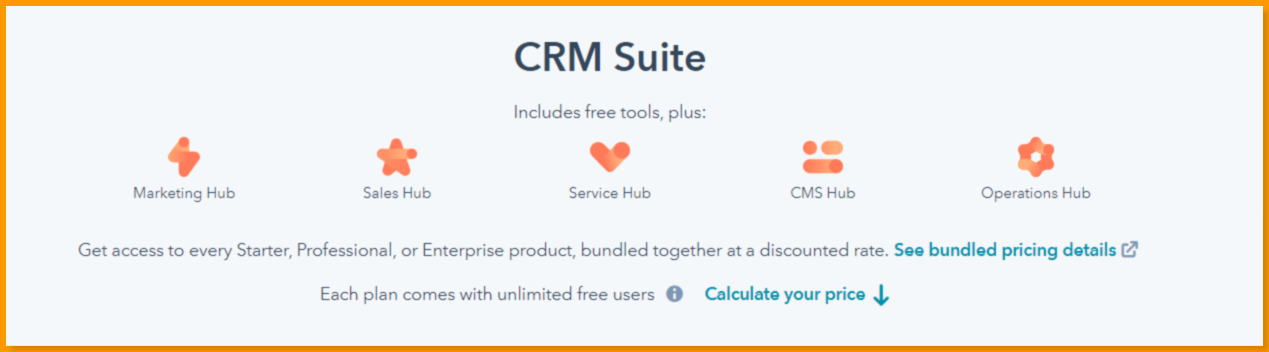
HubSpot offers standalone products for marketing, sales, customer support, and more, but the HubSpot CRM bundle brings the core capabilities together in one unified platform — now supercharged with Breeze AI and other intelligent features.
HubSpot CRM suite tools & key features
HubSpot Marketing Hub
Helps convert traffic into customers, automate inbound campaigns, and align marketing with sales through advanced automation, lead generation, AI-powered content suggestions, and multi-touch revenue attribution. Breeze AI features — like automated content generation and predictive insights — assist with campaign planning and personalization.
HubSpot Sales Hub
Empowers teams to close deals faster with sales automation, engagement tools, and deep prospect insights. Built-in AI agents — such as the Prospecting Agent — automatically research leads, draft outreach, and suggest next actions, saving hours of manual work each week.
HubSpot Service Hub
Scales customer service with helpdesk automation, conversational bots, surveys, and a centralized knowledge base. Breeze Customer Agent handles common support queries across channels (chat, email, social, voice), resolves issues instantly, and escalates complex cases, improving CSAT while reducing workload.
HubSpot CMS Hub
Provides powerful content management with a drag-and-drop editor, SEO tools, and flexible themes. AI aids content creation, suggests smart optimizations, and helps tailor site experiences to different audience segments.
HubSpot Operations Hub
Unifies customer data across systems with 2-way sync, data quality tools, and programmable automation. Breeze Intelligence leverages this unified data to deliver predictive lead scoring, buyer intent signals, and automated insights that help teams make smarter decisions faster.
Breeze AI (new, 2026–2027)
HubSpot’s Breeze AI is the core artificial intelligence layer powering the CRM platform. It includes:
-
-
-
Breeze Assistant — a conversational AI that answers questions, generates content, summarizes records, and helps with workflows.
-
Breeze Agents — purpose-built AI agents (like Customer, Prospecting, Closing, Personalization, and Knowledge Base agents) that automate tasks across marketing, sales, and service without constant oversight.
-
Breeze Intelligence — analytical tools that enrich CRM data, surface insights (e.g., predictive scoring and intent), and guide strategic choices.
-
Breeze Studio & Marketplace — let teams customize or install AI assistants tailored to specific business processes.
-
-
Together, these enhancements allow HubSpot to not only store customer data but also act on it — automating workload, unlocking predictive insights, and enabling truly personalized engagement across the entire customer journey.
Read also: What is HubSpot? Definition, Features, Pricing, Who it’s Best for
What are the benefits of using HubSpot in 2026?
HubSpot remains one of the most widely adopted CRM platforms globally, backed by nearly two decades of continuous product evolution.
In HubSpot CRM 2026, the platform has matured from a traditional CRM into an AI-powered customer platform designed for scale, speed, and cross-team alignment.
When HubSpot pricing is explained in context, its benefits go beyond features — they reflect how the platform supports growing businesses operationally and strategically.
Here are the key benefits of using HubSpot in 2026:
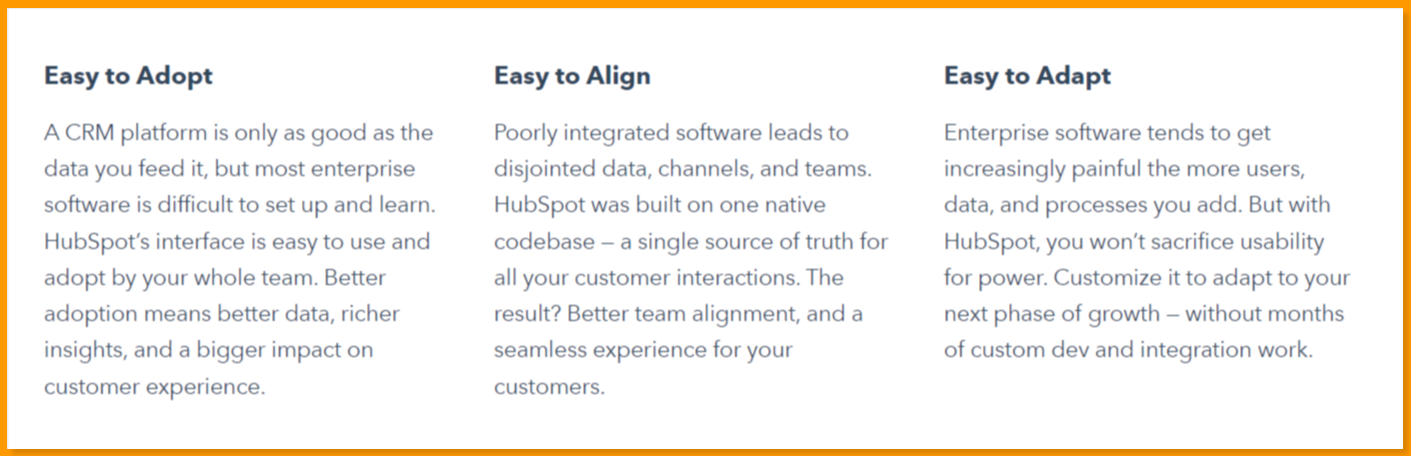
Easy to adopt
HubSpot CRM is known for its intuitive interface and low learning curve, which drives faster onboarding and higher user adoption across teams. With AI-assisted workflows, smart defaults, and guided setup, businesses can start seeing value quickly — resulting in cleaner data, richer insights, and more consistent usage across marketing, sales, and support teams.
Easy to align
Built on a single, native CRM architecture, HubSpot eliminates data silos between teams. Marketing, sales, service, and operations all work from the same customer record, ensuring a unified view of every interaction. This shared data foundation improves collaboration, reduces handoff friction, and delivers a more consistent customer experience across the entire lifecycle — a key reason many companies accept higher HubSpot subscription costs as they scale.
Easy to adapt
Despite its simplicity, HubSpot remains highly flexible. In 2026, the platform offers extensive customization options, including custom objects, workflows, AI-powered automation, integrations, and role-based permissions. Businesses can adapt HubSpot to their processes without sacrificing usability, making it suitable for startups, SMBs, and enterprise teams alike as needs evolve.
Who is HubSpot best for?
HubSpot CRM is a powerful platform built for large, well-funded organizations that can comfortably invest in premium tools and long-term scalability.
However, HubSpot CRM is not the ideal platform for small businesses.
Let’s break down why.
Read also: HubSpot vs Mailchimp vs EngageBay — Which Marketing Tool Is Worth Spending Money?
How HubSpot’s Pricing Model Works in 2026
HubSpot Pricing at a Glance
| Hub | Free / Starter | Professional | Enterprise |
|---|---|---|---|
| CRM / CRM Suite | Free CRM available (basic) | ~$1,170–$1,300/mo | ~$5,000+/mo |
| Marketing Hub | Free trial / $20–$50 | ~$800–$890/mo | ~$3,600/mo |
| Sales Hub | Free / ~$20/mo | ~$100/mo | ~$150/mo |
| Service Hub | Free / ~$20/mo | ~$100–$500/mo | ~$1,200–$1,500/mo |
For 20,000 contacts with CRM + Marketing + Sales Pro in 2026, expect a combined estimate of $3,000–$7,000/mo after contact tier + seats.
HubSpot occasionally runs limited-time promotional pricing on Starter tier plans for new customers — for example, offers that reduce the usual $20 USD per user per month base rate down to around $9–$15 USD per month when billed annually for the first year.
All HubSpot subscription costs listed earlier are standard list rates based on annual billing and the entry contact/user limits for each tier.
Additionally, one-time onboarding or implementation fees are commonly required for Professional and Enterprise plans, particularly on Marketing, Sales, and CRM bundles where advanced setup and training are often part of the contract.
Let’s take a deeper dive into HubSpot pricing plans and the features that come with each.
Read also: Pipedrive vs HubSpot vs EngageBay — Which CRM Is Smarter & Better?
Before looking at specific prices, it’s important to understand how HubSpot structures its pricing — because it changed significantly in 2024 and many buyers are still catching up.
HubSpot now prices primarily by seat (per user), not just by contact volume or feature tier. This affects what you pay, who you pay it for, and how costs scale as your team grows.
There are three types of seats:
-
-
- Core Seats — Give editing and management access across all Hubs you own. Priced at $20/month (Starter), $50/month (Professional add-ons), $75/month (Enterprise add-ons). Included in bundles at Professional and Enterprise levels.
- Sales & Service Paid Seats — Unlock advanced role-specific features such as forecasting, call recording, and ticket routing. Required for each Sales or Service Hub user at Professional or Enterprise tier.
- View-Only Seats — Free and unlimited on paid plans. For team members who only need to read data, not edit it.
-
Marketing Hub, Content Hub, and Data Hub include Core Seats in their Professional and Enterprise pricing. Sales Hub and Service Hub are priced per Paid Seat.
This model makes entry-level pricing attractive — but causes costs to compound quickly as your team grows. A 10-person team needs 10 seats; at Professional level, that means additional seat costs on top of the base plan price.
What features do you get in each Hubspot pricing plan in 2026?
HubSpot CRM pricing is structured around three paid tiers — Starter, Professional, and Enterprise — each designed for a different stage of business growth.
While HubSpot markets these as simple upgrades, the feature depth, automation power, AI access, and scaling limits change significantly at each level.
Before diving into HubSpot subscription costs, here’s a detailed breakdown of what you actually get in each HubSpot pricing plan in 2026.
HubSpot Starter (Best for very small teams)
HubSpot Starter is designed for early-stage businesses that want basic CRM functionality across marketing, sales, and service — without advanced automation.
Includes
-
-
-
Starts at 1,000 marketing contacts
-
Sales Hub Starter: 2 paid users
-
Service Hub Starter: 2 paid users
-
Core CRM, email marketing, landing pages, and basic reporting
-
Limited access to HubSpot’s AI writing and productivity tools (Breeze Assistant-lite features)
-
-
Limits
-
-
-
Email send limit: 5× marketing contacts
-
1 shared inbox
-
25 active lists and 1,000 static lists
-
10 reporting dashboards
-
Up to 1,000 custom properties
-
Basic automation only (up to ~10 automated email actions)
-
No advanced workflows, attribution, or predictive insights
-
-
👉 Starter works for simple use cases, but most automation, AI agents, and reporting power are intentionally restricted.
HubSpot Professional (Built for scaling teams)
HubSpot Professional is where the platform becomes a serious growth tool. This tier unlocks advanced automation, deeper analytics, and meaningful AI functionality — and is where HubSpot pricing increases sharply.
Includes
-
-
-
Starts at 2,000 marketing contacts
-
Sales Hub Professional: 5 paid users
-
Service Hub Professional: 5 paid users
-
Full marketing automation workflows
-
Advanced reporting and attribution
-
Access to Breeze AI agents for marketing, sales, and service
-
Predictive lead scoring and AI-assisted content creation
-
Custom objects and advanced CRM customization
-
-
Limits
-
-
-
Email send limit: 10× marketing contacts
-
Up to 100 shared inboxes
-
1,000 active lists and 1,000 static lists
-
25 reporting dashboards
-
Up to 1,000 custom properties
-
Unlimited automated email actions
-
One-time onboarding fee typically applies
-
-
👉 This is the minimum tier where HubSpot’s automation and AI capabilities feel complete — and where costs start compounding as contacts and users grow.
HubSpot Enterprise (Designed for large organizations)
HubSpot Enterprise targets complex, multi-team organizations that need governance, security, and advanced AI-driven insights at scale. This tier assumes large databases, layered permissions, and sophisticated operations.
Includes
-
-
-
Starts at 10,000 marketing contacts
-
Sales Hub Enterprise: 10 paid users
-
Service Hub Enterprise: 10 paid users
-
Advanced permissions and team partitioning
-
Custom event tracking and multi-touch revenue attribution
-
Full Breeze AI suite, including:
-
AI prospecting and customer agents
-
Predictive forecasting and intent insights
-
Automated knowledge base and service resolution
-
Sandboxes, advanced governance, and compliance features
-
-
-
Limits
-
-
-
Email send limit: 20× marketing contacts
-
Up to 100 shared inboxes
-
1,500 active lists and 1,500 static lists
-
50 reporting dashboards
-
Up to 1,000 custom properties
-
Unlimited automation
-
Mandatory onboarding and implementation fees are common
-
-
👉 Enterprise delivers maximum flexibility and AI depth — but also comes with the highest HubSpot subscription costs and long-term financial commitment.
Key 2026 takeaway
While HubSpot positions its pricing as modular, feature access is heavily tier gated.
Critical automation, reporting, and AI capabilities only become fully usable at the Professional and Enterprise levels, which explains why many growing teams experience rapid cost escalation as they scale contacts and users.
Read also: 5 Top HubSpot Competitors That Cost a Lot Less
HubSpot Pricing: How much does each HubSpot plan cost?
Here’s a quick at-a-glance summary of HubSpot pricing across its most common plans. For a full breakdown of how each hub is individually priced — and how costs change as your team grows — see the sections below.
| Plan | Price | What’s Included |
|---|---|---|
| Free CRM | $0 | Unlimited users, up to 1M contacts, basic tools |
| Starter (per hub) | From $20/seat/month | Basic automation, email marketing, limited features |
| Professional (per hub) | From $100/seat/month or flat monthly | Full automation, reporting, A/B testing |
| Enterprise (per hub) | From $150/seat/month or flat monthly | Advanced permissions, custom objects, full feature set |
| Starter Customer Platform | $20/seat/month | All 5 hubs at Starter level |
| Professional Customer Platform | $1170-$1,300/month | 5 Core Seats included, all hubs at Pro level |
| Enterprise Customer Platform | $4,300/month | 7 seats included, all hubs at Enterprise level |
HubSpot Pricing by Hub — Individual Pricing
If your team only needs one or two hubs, buying individually may be more cost-effective than the full Customer Platform bundle. Below is the pricing for each hub at every tier, based on May 2026 HubSpot list pricing.
Marketing Hub is built for marketing teams running email campaigns, automation workflows, lead nurturing, and reporting. It’s the most commonly purchased hub and the most complex to price due to its contact-based scaling.
Sales Hub gives sales teams CRM automation, pipeline management, meeting scheduling, call recording, and forecasting. It’s priced per paid seat at Professional and Enterprise tiers.
Service Hub covers customer support with ticketing, help desk automation, live chat, and customer feedback tools. Like Sales Hub, it is priced per paid seat at paid tiers.
Content Hub (formerly CMS Hub) is HubSpot’s website and content management system. It includes website hosting, landing pages, blog tools, and SEO recommendations.
Data Hub (formerly Operations Hub) manages data sync, cleaning, and programmable automation between HubSpot and third-party tools. It’s less commonly purchased as a standalone hub.
Commerce Hub enables payments, quotes, and subscription billing directly inside HubSpot.
| Hub | Free | Starter | Professional | Enterprise |
|---|---|---|---|---|
| Marketing Hub | $0 — Up to 1M contacts, basic email | $20/seat/mo — 1,000 marketing contacts | $800-890/mo — 3 seats incl., 2,000 contacts | $3,600/mo — 5 seats incl., 10,000 contacts |
| Sales Hub | $0 — Basic CRM, email tracking | $20/seat/mo | $90/seat/mo | $150/seat/mo |
| Service Hub | $0 — Basic ticketing | $20/seat/mo | $100/seat/mo | $150/seat/mo |
| Content Hub | $0 — Up to 25 pages | $20/seat/mo | $500/mo — 3 seats incl. | $1,500/mo — 5 seats incl. |
| Data Hub | $0 — Data sync only | $20/seat/mo | $800/mo — 1 seat incl. | $2,000/mo — 1 seat incl. |
| Commerce Hub | $0 | $0 | $38/mo | $56/mo |
Note: These individual hub prices are based on May 2026 HubSpot list pricing. Prices are subject to change; always verify at hubspot.com/pricing before purchasing.

HubSpot Customer Platform Bundle Pricing
If you need three or more hubs, the Customer Platform bundle is almost always cheaper than buying the same hubs individually. It’s also the most popular starting point for go-to-market teams that need marketing, sales, and service functionality working together.
| Bundle Tier | Price | What’s Included |
|---|---|---|
| Starter Customer Platform | $20/seat/month | All 5 Hubs at Starter level — best for micro-teams or solo founders |
| Professional Customer Platform | $1170-$1,300/month | 5 Core Seats included — Marketing + Sales + Service + Content + Data at Pro level |
| Enterprise Customer Platform | $4,300/month | 7 seats included — all Hubs at Enterprise level |
The Professional Customer Platform is the most common purchase for growing SMBs. It unlocks full automation, A/B testing, custom reporting, and team-level features across all hubs — while the included seat count covers a small core team.
HubSpot Starter pricing (2026)
Best for very small teams with limited contact growth
-
-
-
1,000 contacts: ~$50/month
(Occasional introductory promotions may apply for new customers) -
10,000 contacts: ~$440/month
-
50,000 contacts: ~$2,040/month
-
100,000 contacts: ~$4,040/month
-
-
👉 Starter appears affordable at entry level but becomes expensive once contact volume increases — despite limited automation and reporting capabilities.
HubSpot Professional pricing (2026)
Minimum tier for serious automation and AI features
-
-
-
2,000 contacts: ~$1,780/month
-
10,000 contacts: ~$2,280/month
-
50,000 contacts: ~$4,080/month
-
80,000 contacts: ~$5,180/month
-
-
👉 This is where HubSpot delivers meaningful value — but also where pricing acceleration becomes very noticeable as contact tiers expand.
HubSpot Enterprise pricing (2026)
Designed for large organizations with complex needs
-
-
-
10,000 contacts: ~$5,000/month
-
50,000 contacts: ~$5,400/month
-
100,000 contacts: ~$5,850/month
-
1,000,000 contacts: ~$11,750/month
-
-
👉 While Enterprise pricing grows more gradually at higher tiers, the starting commitment is already high, and onboarding fees are commonly required.
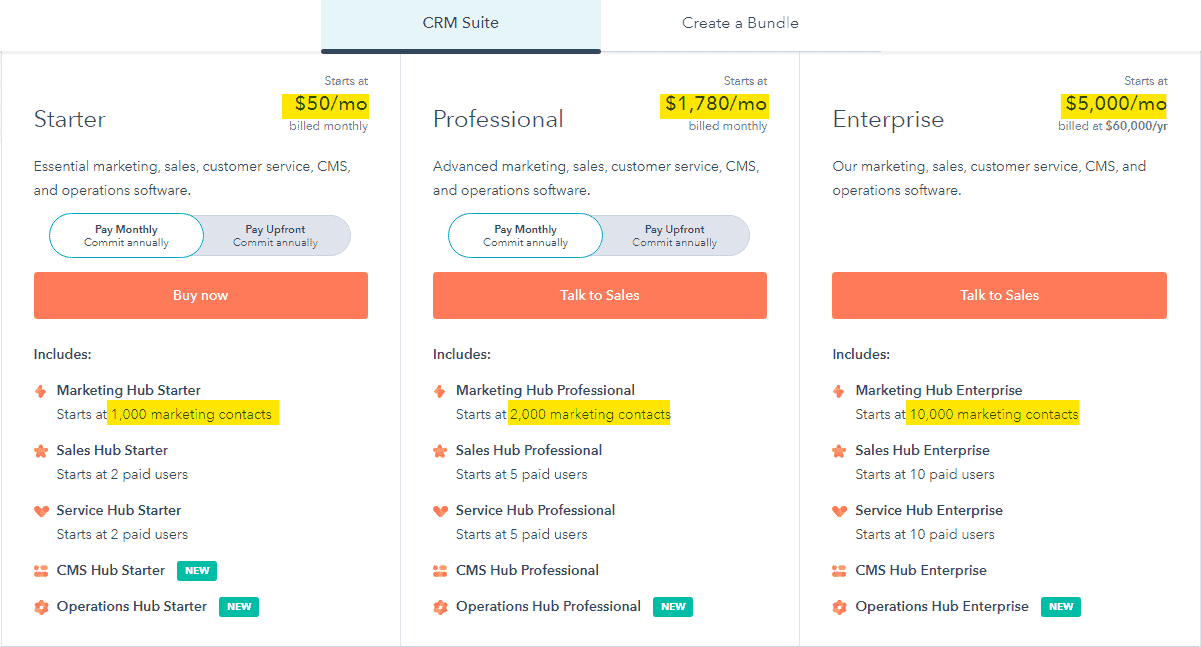
HubSpot’s pricing doesn’t just increase with features — it increases with growth itself.
As your contact database expands, costs can scale rapidly across all tiers, often catching growing teams off guard.
This contact-based pricing structure is a major reason why HubSpot works best for well-funded companies that can absorb long-term subscription growth — and why many SMBs eventually explore alternatives.
But this isn’t the whole story.
HubSpot also charges a mandatory onboarding fee for the Professional and Enterprise plans.
We’ll cover that in the subsequent sections.
Before that, let’s check out HubSpot pricing for startups.
Read also: 8 Surprisingly Awesome HubSpot Alternatives
HubSpot pricing for startups (2026)
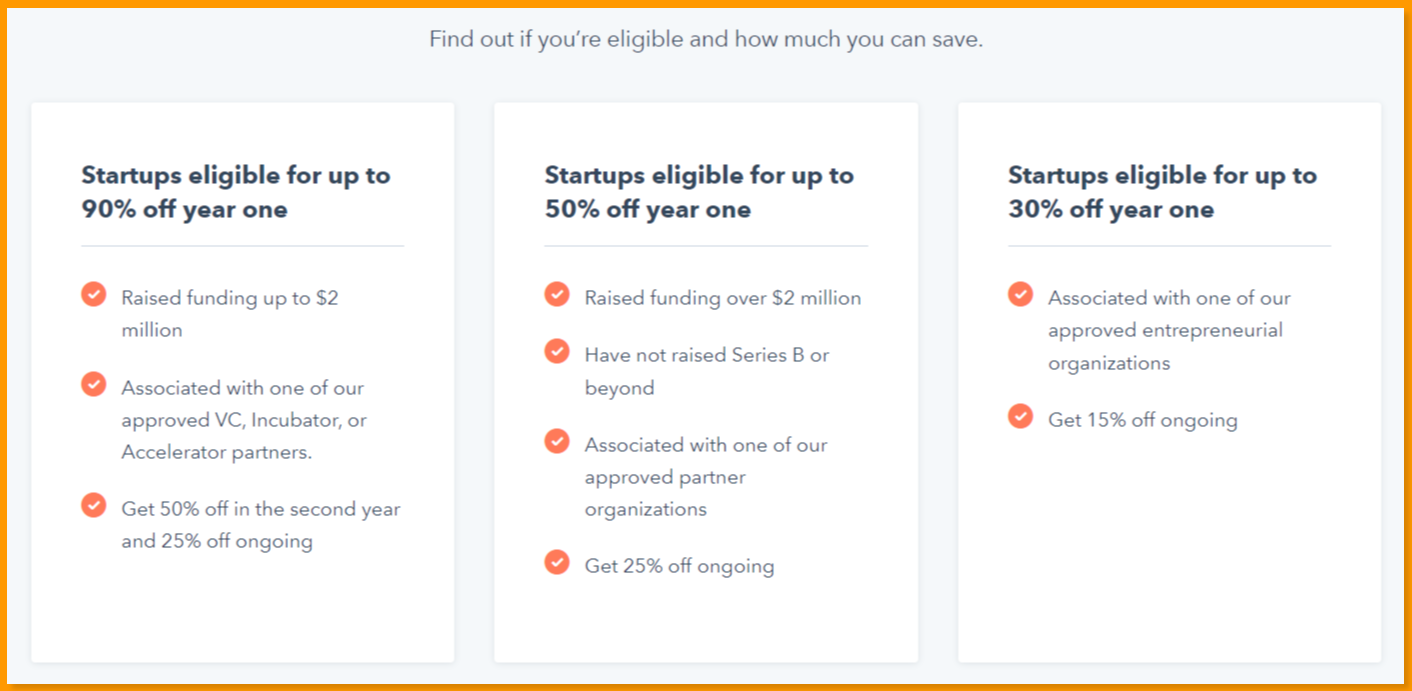
HubSpot offers a separate program called HubSpot for Startups, which is often confused with the HubSpot Starter plan — but the two are very different.
HubSpot for Startups is a partner-led discount program designed to help early-stage companies access HubSpot’s paid tools at reduced rates for a limited time.
Depending on your startup’s funding stage and eligibility, HubSpot for Startups can offer temporary discounts ranging from 30% to 90% on select HubSpot subscriptions.
Here’s how eligibility typically works in 2026:
-
-
- 30% discount
-
Available to startups that are affiliated with one of HubSpot’s approved startup partners, accelerators, or entrepreneurial organizations — regardless of funding stage.
-
-
- 50% discount
-
Offered to startups that:
1) Are affiliated with a HubSpot partner organization
2)Have raised more than $2 million in funding
3) Have not yet reached Series B
-
-
- 90% discount
-
Reserved for very early-stage startups that:
- Are affiliated with a HubSpot partner organization
- Have raised under $2 million in funding
Important 2026 considerations
-
-
-
These discounts are time-bound (typically valid for 12–24 months)
-
Discounts phase out as the startup matures, often reverting to standard HubSpot subscription costs
-
The program does not eliminate onboarding fees on Professional or Enterprise plans
-
Eligibility and discount levels are verified annually and can change based on funding status
-
-
Key takeaway
While HubSpot for Startups can significantly reduce initial costs, it does not change HubSpot’s long-term pricing structure.
As discounts expire and contact volumes grow, many startups experience a sharp increase in monthly spend — making it critical to plan beyond the discounted period.
Does HubSpot offer standalone plans in 2026?
Yes — HubSpot continues to offer standalone plans for individual hubs, including Marketing Hub, Sales Hub, Service Hub, CMS Hub, and Operations Hub.
However, it’s important to note that the prices typically advertised are starting rates only.
In 2026, standalone HubSpot pricing still scales based on marketing contacts, paid users (seats), and feature tiers, meaning total costs increase as your database grows or as more team members are added.
As a result, many businesses that begin with a single hub often find themselves upgrading to higher tiers—or bundling multiple hubs—over time to unlock essential automation, reporting, and AI features.
HubSpot’s pricing is now largely seat-based (per user), and starter rates are much lower than older $50/mo list prices — most start around $15–$20/user/month for Starter tiers, with Professional and Enterprise tiers priced by seat at significantly higher
Here’s a quick comparison of all the standalone plans:
| Hub | Starter (per user/month) | Professional (per seat/month) | Enterprise (per seat/month) |
|---|---|---|---|
| Marketing Hub | ~$20 / user/mo (Starter Core Seat) | ~$890 / mo (includes 3 core seats; extra seats ~$50 each) | ~$3,600 / mo (includes 5 core seats; extra seats ~$75 each) |
| Sales Hub | ~$15–$20 / user/mo (Starter) | ~$100 / seat/mo | ~$150 / seat/mo |
| Service Hub | ~$15–$20 / user/mo (Starter) | ~$100 / seat/mo | ~$150 / seat/mo |
Key 2026 Clarifications
✅ Starter pricing is no longer $50/mo per hub — most Starter plans for Marketing, Sales, and Service start around $15–$20 per user per month, depending on billing (annual vs month-to-month). Promotional first-year discounts (e.g., $9–$15/user/mo) are still common.
✅ Professional and Enterprise tiers are now priced by seat type and number of included seats rather than a flat plan price. For example, Marketing Hub Professional typically bundles multiple included core seats and then charges per additional seat.
✅ Support/Service Hub pricing at Professional and Enterprise tiers generally follows similar per-seat pricing to Sales Hub, with added automation and advanced service tools at higher levels.
✅ These figures are base list prices and do not include add-on seats, contact tier increases (especially for Marketing Hub), or implementation/onboarding fees that may apply on higher tiers.
Why this matters in 2026
HubSpot’s pricing structure in 2026 is more granular:
-
-
-
Core seats vs. specialized seats: Depending on feature needs, businesses might pay different rates for marketing, sales, or service seats.
-
Contact tiers increase Marketing Hub costs: Marketing Hub’s billing is also influenced by the number of marketing contacts you manage, which can significantly raise total spend beyond the base pricing.
-
Bundling impacts cost: Purchasing standalone hubs separately can sometimes be more expensive than bundling them into a CRM Suite Customer Platform bundle, depending on seat counts and contacts.
-
-
Read also: HubSpot vs MailChimp: A Complete Product Comparison
HubSpot Onboarding Fees — What You Must Budget For
One cost that surprises many buyers is the mandatory onboarding fee charged for Professional and Enterprise plans. This is a one-time payment, separate from your monthly or annual subscription, and it is non-negotiable unless you qualify for specific exceptions.
| Hub | Professional Onboarding Fee | Enterprise Onboarding Fee |
|---|---|---|
| Marketing Hub | $3,000–$7,000 (one-time) | $7,000–$10,000 (one-time) |
| Sales Hub | $1,500–$7,000 (one-time) | $3,500–$10,000 (one-time) |
| Service Hub | $1,500–$7,000 (one-time) | $3,500–$10,000 (one-time) |
| Content Hub | Recommended (no fixed fee) | Recommended (no fixed fee) |
| Data Hub | Recommended (no fixed fee) | Recommended (no fixed fee) |
**Onboarding fees are typically negotiable by up to 50%, especially when purchased through a certified HubSpot Solutions Partner.
Key things to know about onboarding fees:
-
-
- Onboarding fees can be paid directly to HubSpot or through a certified HubSpot Solutions Partner (who may redirect the fee toward implementation work).
- These fees are waived or reduced for participants in HubSpot’s Startups programme.
- Always factor onboarding costs into your first-year budget when evaluating HubSpot at Professional or Enterprise tier. A Professional Customer Platform subscription at $1170-$1,300/month could carry an additional $3,000–$7,000 onboarding fee in Year 1.
-
HubSpot Pricing: Hidden Costs Most Buyers Miss
‘HubSpot hidden costs’ is one of the most-searched HubSpot pricing topics — and for good reason. The list price is rarely the all-in price. Here are the add-on and overage costs that most buyers encounter after signing their contract.
| Item | Detail |
|---|---|
| Marketing Contact Overages | Marketing Hub prices include a base number of marketing contacts. Exceeding this limit adds cost. At Professional level, additional contacts are charged beyond the included 2,000. |
| Additional Core Seats | Beyond the seats included in Professional/Enterprise bundles, each extra Core Seat costs $50/month (Professional) or $75/month (Enterprise). |
| Breeze AI Credits | HubSpot’s AI features (Breeze Intelligence) consume credits. Plans include a limited allocation; additional credits are available from approximately $45/month per 5,000 credits. HubSpot eliminated free data enrichment in March 2025 — Breeze Credits are now a necessary ongoing cost for most Professional and Enterprise users. |
| Reporting & Analytics Add-On | Advanced reporting beyond plan limits can require a paid add-on — approximately $200/month for teams needing extra dashboards and custom reports. |
| Dedicated IP (Email Sending) | Available on Marketing Hub Professional and Enterprise only, typically around $300/month. Relevant for high-volume email senders who need better deliverability control. |
| Sandbox Environment | A sandbox (testing environment) is free at Enterprise. On Professional plans it is a paid add-on at approximately $300/month. |
| API Limit Increases | High-volume API usage beyond plan defaults requires a separate quote from HubSpot. |
| Annual Contract Requirement | Most Professional and Enterprise plans require a 12-month commitment. Cancelling early typically does not result in a refund. |
| Annual Renewal Uplift | HubSpot’s March 2024 pricing model change includes an automatic ~5% annual renewal uplift at contract renewal. This is negotiable — raise it 90 days before your renewal date. |
For businesses looking to avoid these add-on costs and long-term contracts, EngageBay includes marketing, sales, and service automation in a single plan with no hidden onboarding fees and no per-contact surcharges at equivalent tiers.
What Do Buyers Actually Pay for HubSpot in 2026?
-
-
- Most buyers pay 30–35% below HubSpot’s published list prices, based on real procurement data from thousands of contracts.
- Small businesses (10–50 employees) needing Marketing Hub Pro + Sales Hub Pro pay approximately $620–$670/month after negotiation, versus the $890 list price.
- Mid-market teams on the Professional Customer Platform pay approximately $760–$820/month vs the $1,170–$1,300 list.
- Key negotiation levers: competing quotes, quarter-end timing (March 31 / June 30 / September 30 / December 31), multi-year commitment proposals.
- The ~5% annual renewal uplift — built into HubSpot’s March 2024 model — increases your subscription automatically at renewal unless you push back.
-
EngageBay pricing is completely transparent — no negotiation games, no renewal uplifts, and no mandatory onboarding fees. What you see on the pricing page is what you pay.
What Are the Drawbacks of HubSpot Pricing in 2026?
Since this blog focuses on pricing, it’s important to look beyond feature lists and examine the practical cost implications of using HubSpot long term.
While HubSpot is a powerful platform, its pricing model introduces several drawbacks—especially for startups and growing SMBs.
Below are the key pricing-related limitations to be aware of in 2026:
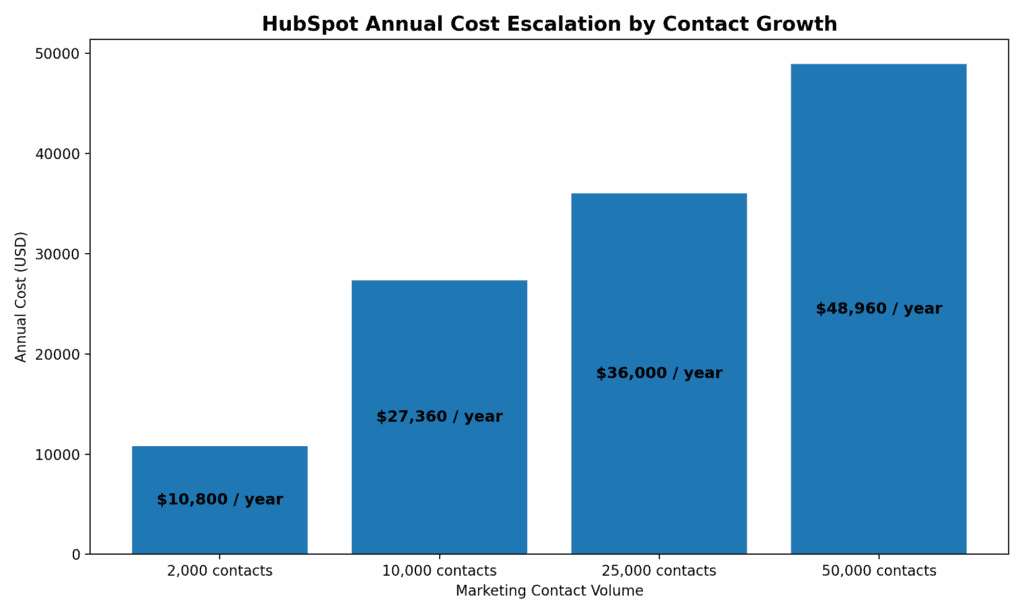
Annual cost escalation when HubSpot contacts grow from 2 K to 50 K
High onboarding and implementation costs
HubSpot requires mandatory onboarding for most Professional and Enterprise subscriptions. These are one-time fees charged upfront and are not optional in many cases.
Typical onboarding costs in 2026:
-
-
-
Professional: ~$3,000–$4,000 (commonly around $3,750)
-
Enterprise: ~$10,000–$12,000 (often ~$12,000)
-
-
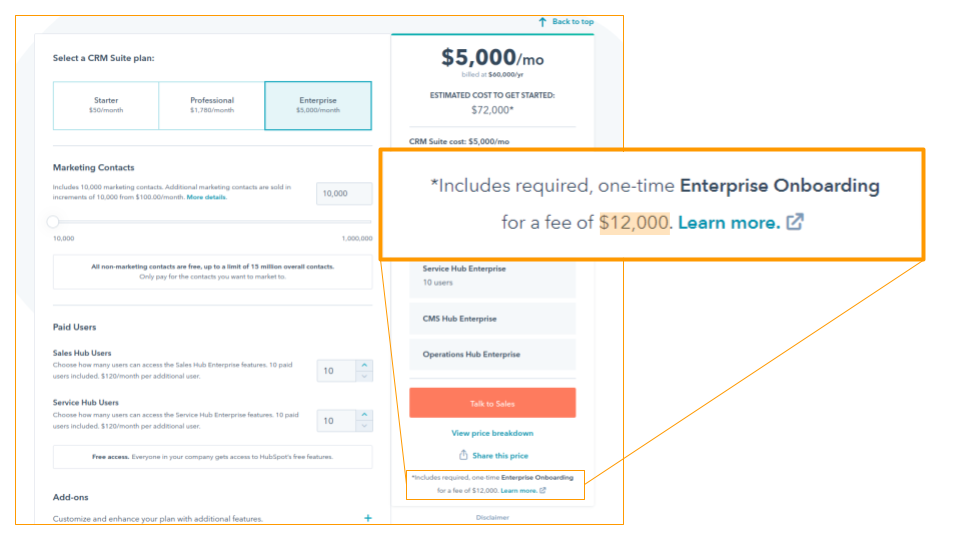
An example of HubSpot’s expensive onboarding fee
These fees are charged regardless of how simple your setup may be and significantly increase the first-year cost of ownership.
If you want to know more about HubSpot migration services, you can check out their website.
Mandatory annual contracts
Most HubSpot paid plans—especially Professional and Enterprise tiers—require a 12-month minimum commitment.
What this means in practice:
-
-
-
You are billed for the entire year upfront or contractually
-
Canceling mid-year does not stop billing
-
Downgrades are typically only allowed at renewal
-
-
For example, if you subscribe in January and decide in February that HubSpot isn’t the right fit, you’re still financially locked in until the end of the contract year.
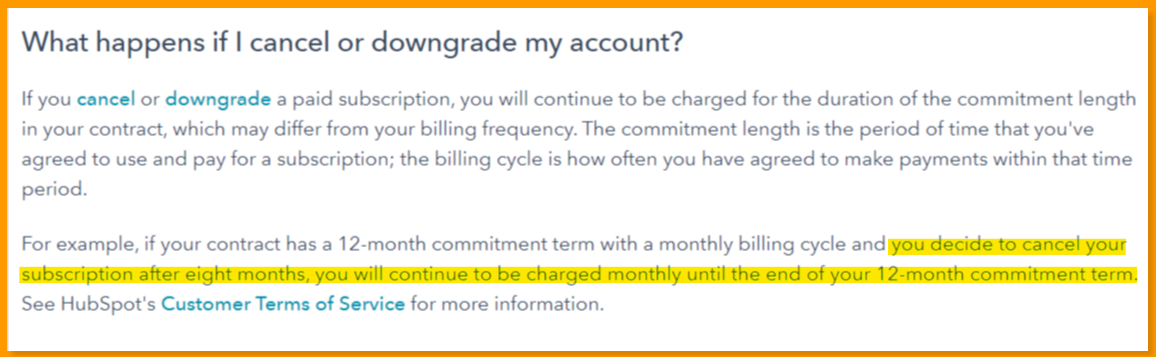
Rapid cost escalation as contacts grow
HubSpot uses a contact-based pricing model, which means your bill increases as your marketing database grows—even if your feature usage stays the same.
In 2026, this becomes especially noticeable as contacts scale from a few thousand to tens of thousands:
-
-
-
Starter plans become expensive beyond early growth
-
Professional plans escalate sharply once you cross mid-tier contact thresholds
-
Enterprise pricing starts high and still increases at scale
-
-
This pricing structure often catches growing teams off guard, particularly those with fast-growing email lists or inbound pipelines.
Expensive add-ons beyond base plans
Even on higher tiers, many advanced capabilities require paid add-ons, which increase monthly costs further.
Common add-ons in 2026 include:
-
-
-
Additional dashboards: ~$200/month
-
Expanded custom reporting: ~$200/month
-
API limit increases: ~$500/month
-
Additional seats and contact tiers: priced separately
-
-
While base plans include a limited number of dashboards and reports, teams that need deeper analytics or broader visibility often end up paying significantly more.
HubSpot free plan has sharp upgrade penalties
HubSpot’s free plan allows storing a large number of contacts, which can feel generous at first. However, once you upgrade to a paid plan:
-
-
-
All marketing contacts immediately count toward billing tiers
-
Costs can spike overnight if contacts aren’t carefully segmented
-
HubSpot branding remains until you move to a paid plan
-
-
This makes the transition from free to paid far more expensive than many users initially expect.
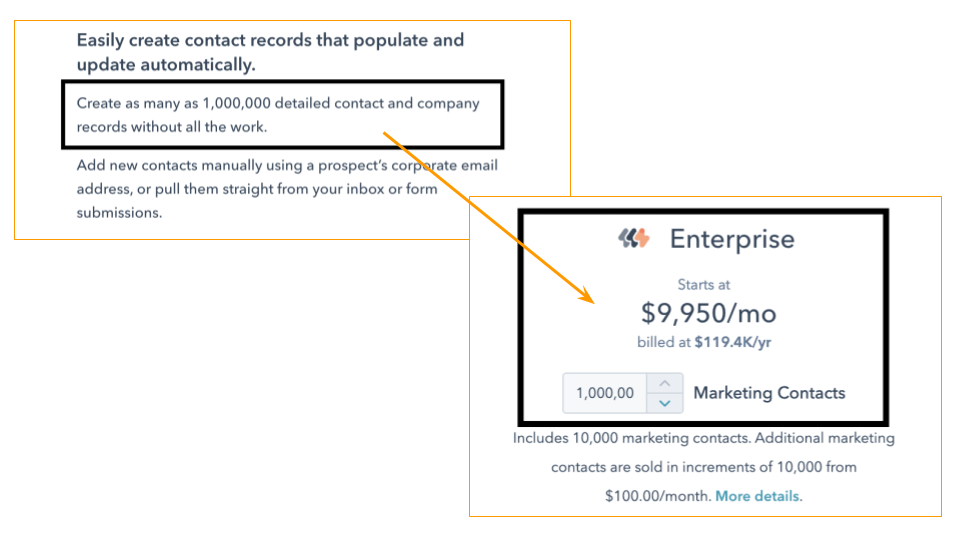
Besides, the free plan comes with HubSpot branding, which can only be removed when you upgrade to a paid plan.
Read also: Is HubSpot CRM Truly Free? An Unbiased Guide (with HubSpot User Reviews)
HubSpot for Startups comes with limitations
The HubSpot for Startups program can offer meaningful short-term discounts—but it has clear constraints:
-
-
-
You must be affiliated with an approved startup or accelerator partner
-
Funding thresholds apply to unlock higher discounts
-
Discounts are temporary (typically 12–24 months)
-
After the discount period, pricing reverts close to standard rates
-
-
Most importantly, the program is designed for venture-backed startups, not traditional small businesses.
Once discounts expire, many startups face a sudden jump to four-figure monthly costs.
Mandatory Seat Based Model
The mandatory seat-based model can be confusing and expensive for growing teams. Unlike older pricing where you paid mainly for features and contacts, the current model charges per active user across multiple seat types. A 10-person team could easily require a mix of Core Seats and Paid Sales or Service Seats, with the total license cost compounding quickly before any add-ons or overages are included.
Key takeaway
HubSpot’s pricing works best for well-funded companies that can absorb:
-
-
-
High upfront onboarding fees
-
Long annual commitments
-
Rising costs tied directly to contact growth
-
Add-on driven feature expansion
-
-
For startups and SMBs, HubSpot often starts affordable—but becomes increasingly expensive as the business scales.
Planning beyond the first year is essential to avoid unexpected budget pressure.
Read also: HubSpot Pros And Cons — A Candid Assessment
User reviews of HubSpot
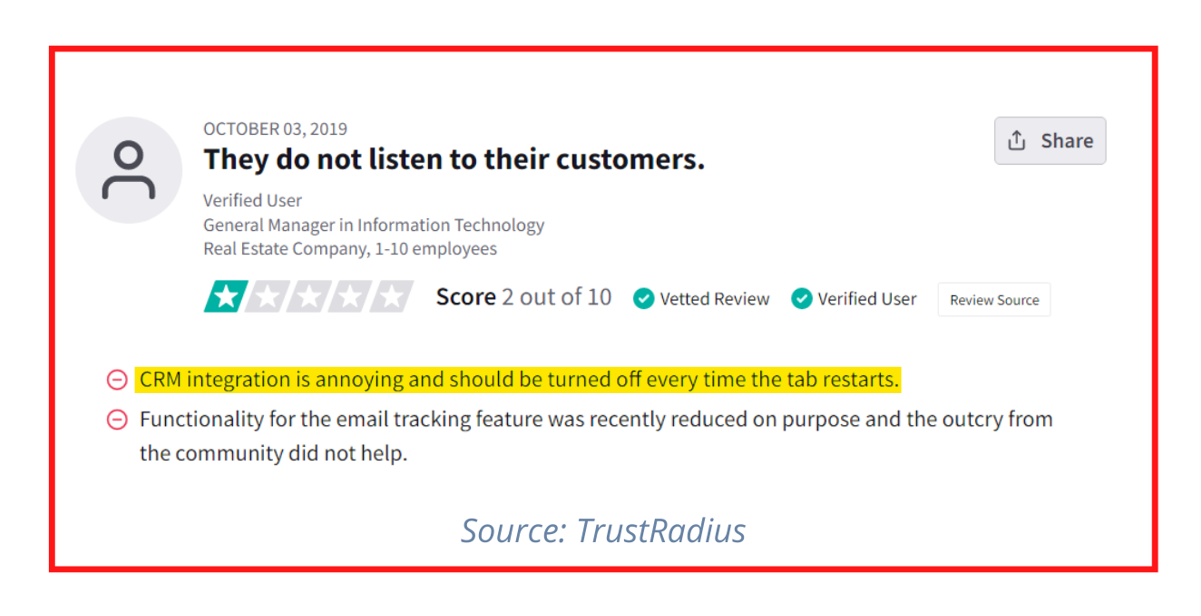
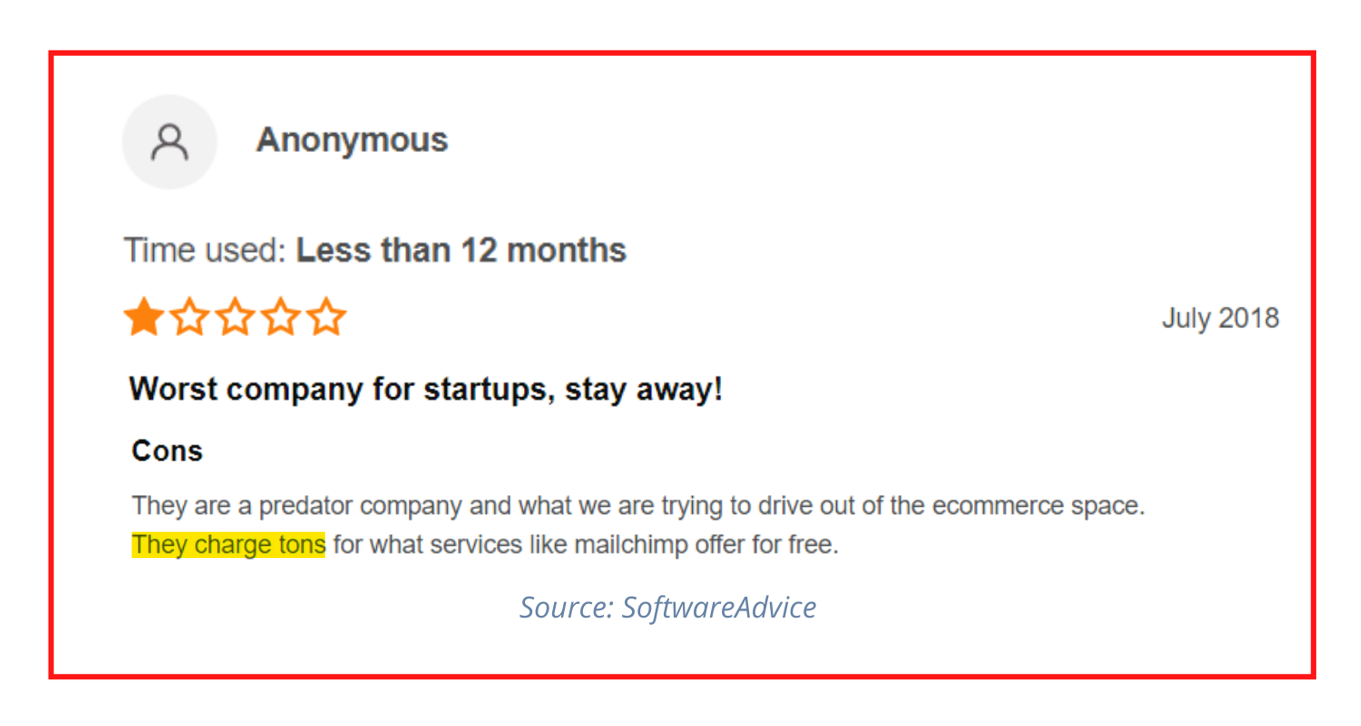
Check out some of the complaints that paid users shared after using HubSpot. 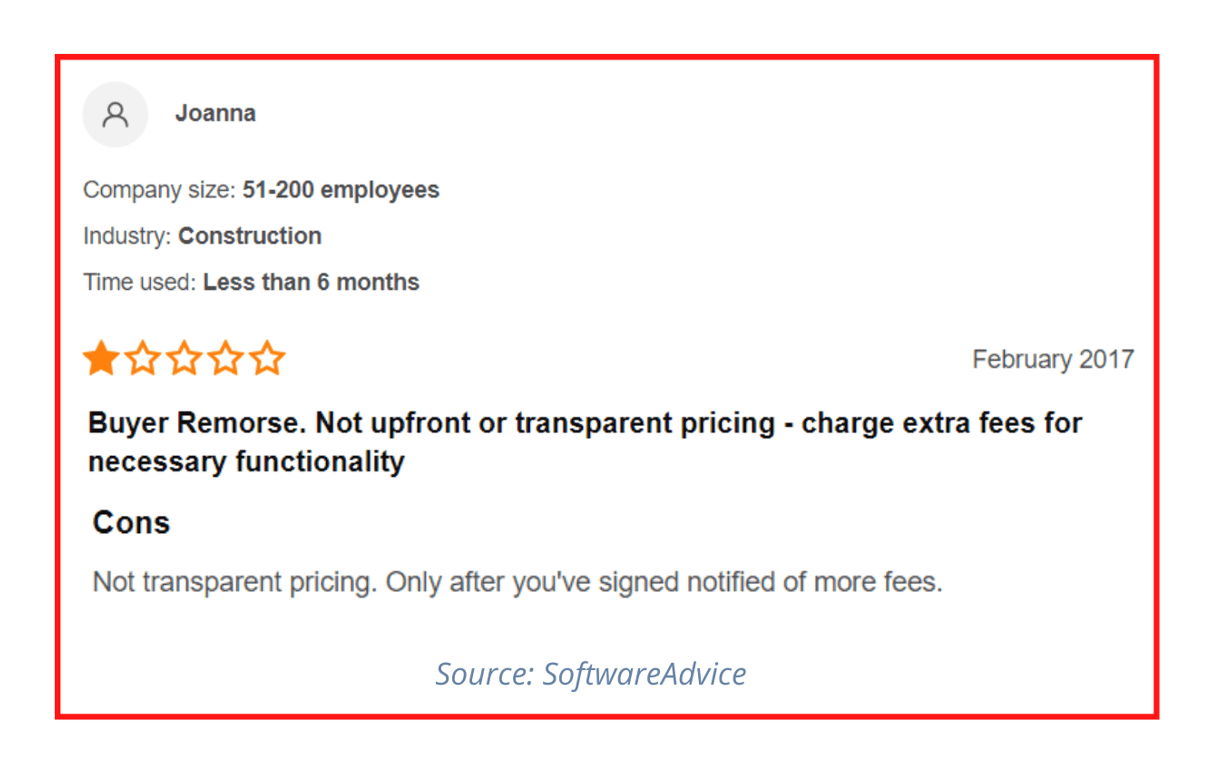
Now that you’ve seen the pricing and the drawbacks, let’s find out how expensive HubSpot CRM really is through an illustration.
HubSpot Pricing Decoded: What They Don’t Want You to Know
Read also: HubSpot vs Keap: Is HubSpot Really a Better Product?
What Does HubSpot Actually Cost? A Real Team Example
List prices only tell part of the story. Here’s what HubSpot’s Professional Customer Platform would actually cost for a typical 10-person team in 2026.
Scenario: 10-person team — 5 sales reps, 3 marketers, 2 support agents. Needs: CRM + email marketing + basic sales automation + support ticketing. Target contact list: 5,000 marketing contacts.
| Cost Item | Monthly Amount |
|---|---|
| Professional Customer Platform (base) | $1170-$1,300/month (5 Core Seats included; negotiated rates typically at the lower end) |
| Additional Core Seats (5 more users × $50) | $250/month |
| Additional Marketing Contacts (2,000 → 5,000) | Variable overage charge |
| Estimated Monthly Total | $1,550+/month |
Buyers who engage HubSpot’s sales team with competitive quotes typically achieve 30–35% discounts, reducing the base to approximately $845–$910/month — but even at this rate, Year 1 total cost remains significantly higher than EngageBay for a comparable feature set.
First-Year Cost Breakdown:
-
-
- Monthly subscription × 12 = approximately $18,600
- One-time onboarding fee (Professional): approximately $3,000–$6,000
- Estimated Year 1 Total: approximately $17,000–$24,600+ depending on negotiated rate and contact overages
-
EngageBay equivalent for the same team: Growth plan at $55.24/month — over 95% cheaper at an equivalent feature set, with no onboarding fee and no long-term contract required.
EngageBay pricing figures are based on the current EngageBay pricing page. See the comparison table below for full feature and price details.
That’s why we’ve compiled a list of the best HubSpot alternatives that won’t burn through your $$$.
Read also: HubSpot vs GetResponse: A Comprehensive Review and Analysis
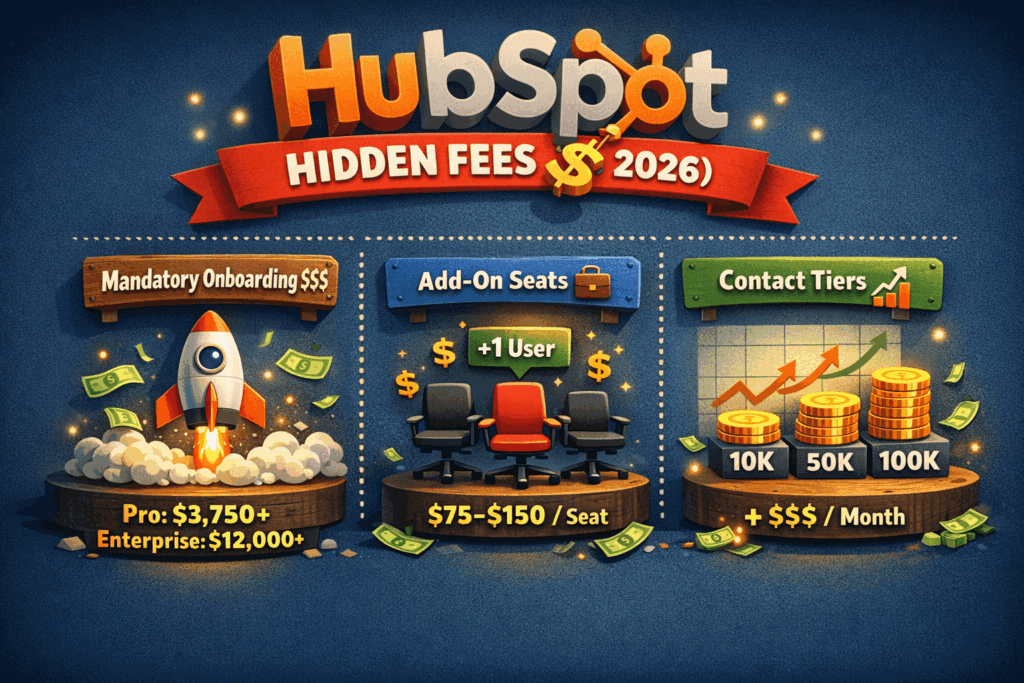
HubSpot onboarding, add-on seat & contact-tier fees.
4 Ways to Lower Your HubSpot Costs
If you’re committed to HubSpot, there are legitimate ways to reduce your total spend.
1. Pay annually upfront. HubSpot offers a discount (approximately 10%) for annual prepayment versus monthly billing. Monthly billing is typically 20–25% more expensive over a 12-month period.
2. Buy the Customer Platform bundle. If your team needs three or more hubs, the bundled Customer Platform is cheaper than buying the same hubs individually. The Professional Customer Platform at $1170-$1,300/month represents significant savings versus purchasing Marketing Hub Pro, Sales Hub Pro, and Service Hub Pro separately.
3. Apply to HubSpot for Startups. Qualifying startups — typically funded or accelerator-backed with under $10M raised — can receive up to 90% off in Year 1 and 50% off in Year 2. This is one of the most underused discounts available.
4. Work with a HubSpot Solutions Partner. Certified partners can sometimes negotiate better terms or redirect the mandatory onboarding fee toward implementation work, effectively making the onboarding process more valuable for the cost.
What Are the Best HubSpot Alternatives in 2026?
While there are hundreds of CRM software out there, EngageBay and ActiveCampaign are two great HubSpot alternatives.
Let’s see how.
| Feature | EngageBay | HubSpot | ActiveCampaign |
|---|---|---|---|
| Starting price | $12.74/mo (Basic, annual billing) | ~$18/mo (Starter promo)Standard Starter typically ~$20–$25/user/mo | $29/mo (Starter) |
| Free plan | ✔ | ✔ | ✖ |
| Free trial | ✔ | ✔ | ✔ |
| All-in-one suite | ✔ | ✔ (via CRM Suite) | ✖ |
| Marketing automation | $55.24/mo (Growth plan) | ~$890/mo (Marketing Hub Professional) | $29/mo+ |
| Analytics & reporting | Included from ~$101.99/mo | Primarily Professional tier~$890/mo+ | Included from $29/mo |
| Onboarding | Free | Mandatory for Pro & Enterprise~$3,750 (Pro)~$12,000 (Enterprise) | Free |
| G2 rating (2026) | 4.6 / 5 | 4.4 / 5 | 4.5 / 5 |
Important 2026 clarifications
-
-
-
HubSpot’s $18/mo price is promotional, usually limited to new users and the Starter tier. Real costs increase quickly with users, contacts, and automation needs.
-
Marketing automation and advanced analytics in HubSpot are realistically locked behind the Professional tier, which starts close to $890/month.
-
Onboarding fees for HubSpot are significantly higher than earlier years and are mandatory in most Pro and Enterprise contracts.
-
EngageBay and ActiveCampaign include automation and analytics at much lower entry points, with no onboarding fees.
-
-
Key takeaway
In 2026, HubSpot remains the most feature-rich but cost-intensive option, especially once automation, analytics, and scale come into play.
EngageBay and ActiveCampaign deliver many core capabilities earlier and with far more predictable pricing—making them more accessible for SMBs and growing teams.
EngageBay vs HubSpot
#1. EngageBay
EngageBay was built from the ground up with affordability in mind – an all-in-one marketing, sales, and customer support software for SMBs that need all the features but with a reasonable price tag.
Let’s take a look at EngageBay’s features:
EngageBay Features
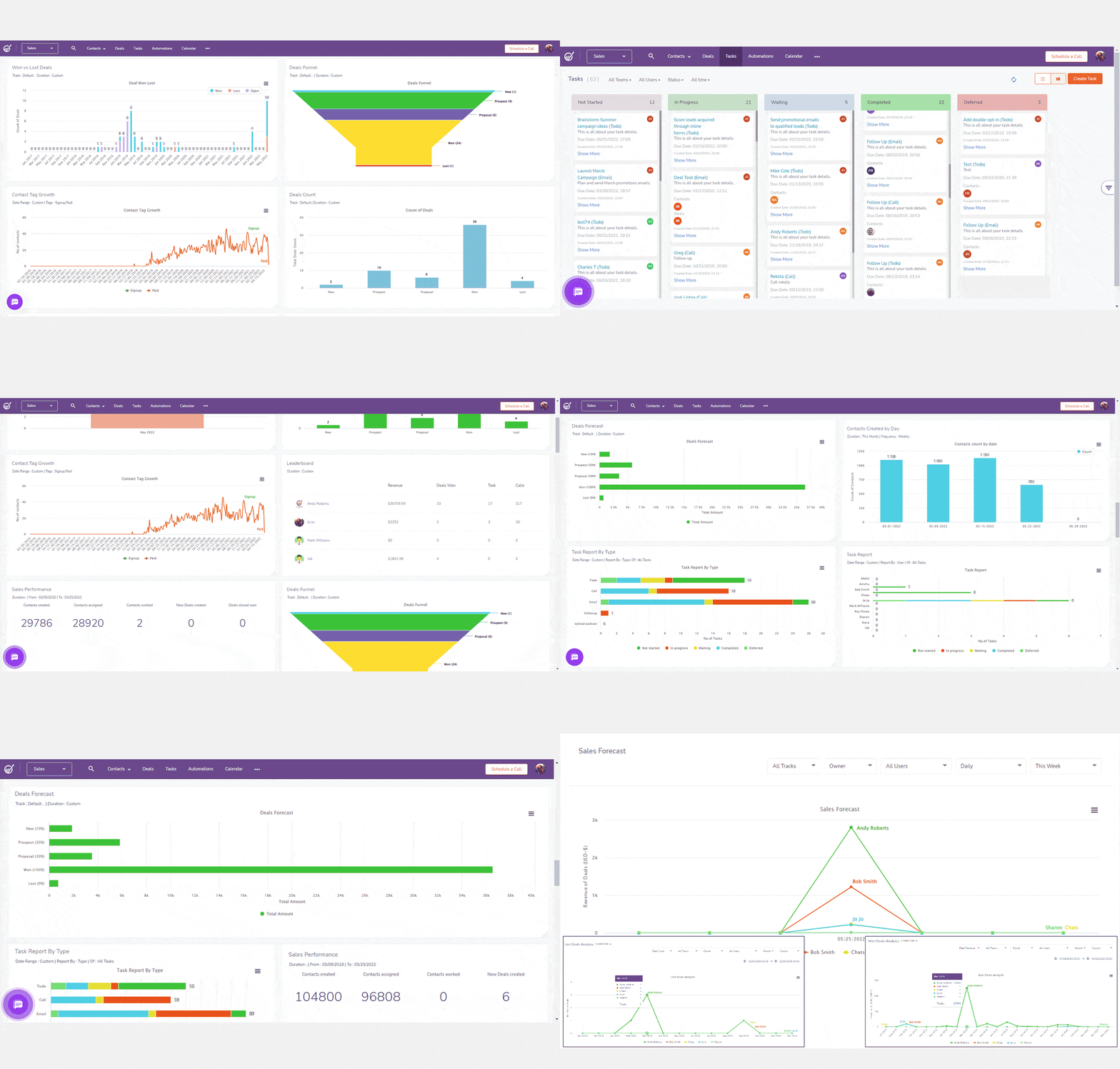
If you’re on the hunt for a budget-friendly CRM that supports you across sales, marketing, and service, EngageBay is worth a closer look. (EmailToolTester)
It’s hard to list out all the features EngageBay offers. We’ll look at the key ones:
-
-
- Email marketing: Send newsletters, nurture your leads through drip campaigns, or use autoresponders to send out welcome emails, cart abandonment alerts, and birthday wishes.
- Automation: Improve productivity and efficiency through EngageBay’s multistep visual automation builder.
- Split testing: Test each element of your landing pages and email broadcasts using the A/B testing feature and determine the winning variation.
- Sales pipeline: Streamline your sales funnel and pipelines using EngageBay’s easy-to-use tools.
- Customer support: EngageBay offers a suite of support tools, including live chat, helpdesk, ticket prioritization, routing, canned responses, and service automation.
-
Read also: EngageBay vs HubSpot — Market Leader or Emerging Powerhouse?
EngageBay Pricing
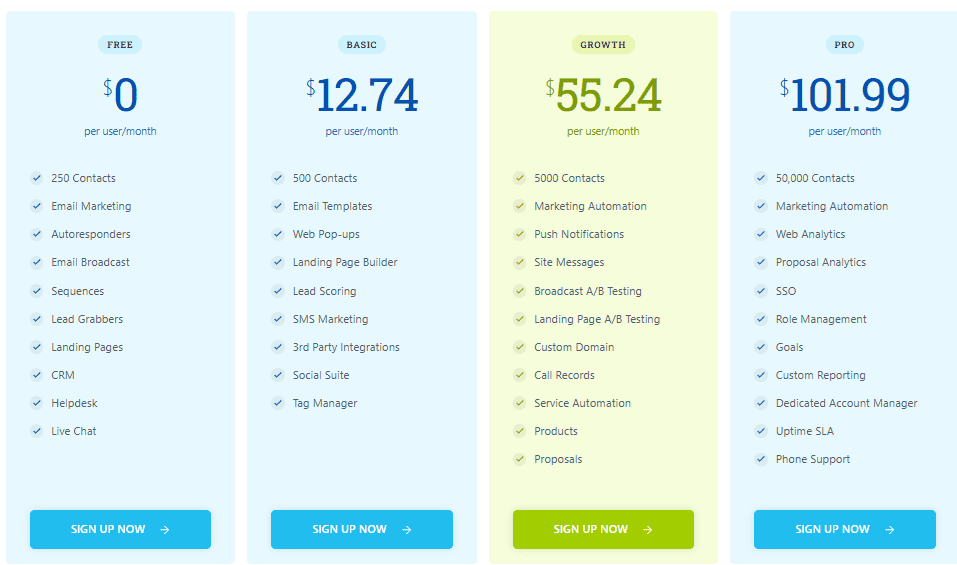
Let’s check out the pricing:
Free
-
-
- $0/mo
- Includes 500 contacts
- Includes 1,000 emails/mo
- You get email marketing, email broadcasts, autoresponders, landing pages, lead generation, project management, CRM, live chat, and helpdesk
-
Basic
-
-
- $12.74/mo
- Includes 1,000 contacts
- Includes 3,000 emails/mo
- You get email templates, lead scoring, web pop-ups, landing page builder, SMS marketing, and marketing and sales activity reporting dashboard
-
Growth
-
-
- $55.24/mo
- Includes 10,000 contacts
- Includes 25,000 emails/mo
- You get marketing automation, call records, email broadcast A/B testing, proposals, products, and timezone-based email delivery
-
Pro
-
-
- $101.99/mo
- Offers unlimited contacts
- Includes 50,000 emails/mo
- You get advanced features including proposal analytics, web analytics, SSO, goals, uptime SLA, account-based marketing, and a dedicated account manager
- EngageBay support includes free onboarding sessions, migration services, and priority phone support
-
In addition, you get a 10% discount on annual plans and a 20% discount on biennial plans.
Learn more about EngageBay:
Create my free EngageBay account now
#2. ActiveCampaign
ActiveCampaign is another excellent HubSpot alternative, mainly as it offers CXA (Customer Experience Automation) to help you put your customers first.
ActiveCampaign Features
-
-
- The CXA (Customer Experience Automation) platform’s features to help you capture prospects include email marketing, landing pages, and segmentation.
- Marketing automation, goals, dynamic content, and SMS marketing maps help you nurture your leads
- ActiveCampaign’s pipelines, win probability, sales engagement, and split actions help convert leads into paying customers.
- You can also keep your customer engaged and loyal to your brand through site messaging, web personalization, and chats.
-
Read also: ActiveCampaign vs HubSpot vs EngageBay – Which CRM Is Best?
ActiveCampaign Pricing
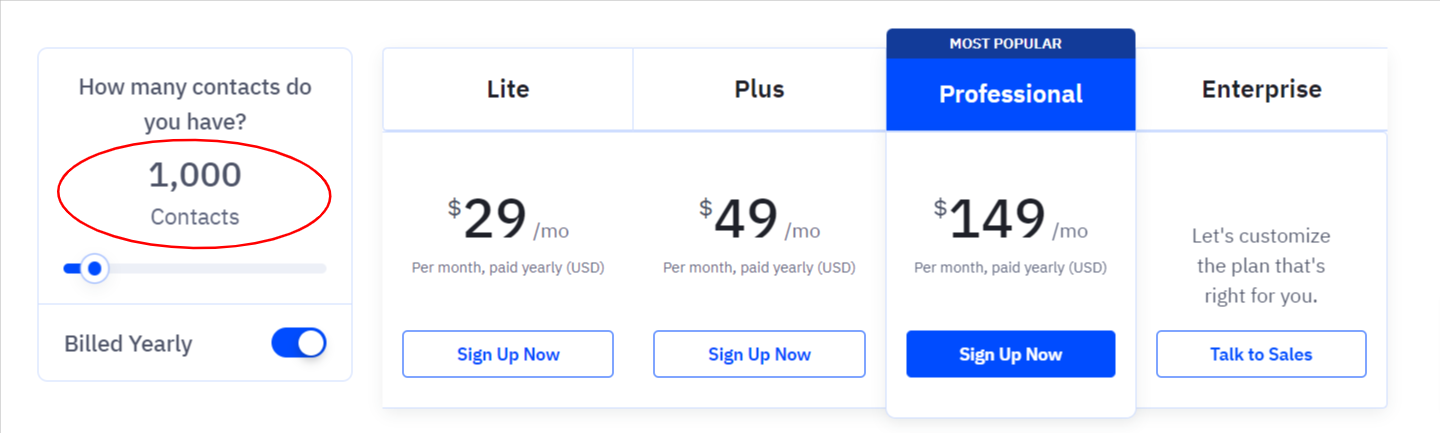
ActiveCampaign has four plans:
Lite
-
-
- $29/month for 1,000 contacts
- Includes email marketing, marketing automation, capture forms, sales emails, and segmented outreach.
-
Plus
-
-
- $49/month for 1,000 contacts
- Includes landing pages, automations map, contact scoring, conditional content, task reporting, SMS marketing, and lead scoring
-
Professional
-
-
- $149/month for 1,000 contacts
- Includes predictive sending, website personalization, conversion reporting, win probability, and split automations
-
Enterprise
-
-
- Custom-priced
- Includes free design services, social data enrichment, custom domain, contact enrichment, HIPAA support, unlimited users, and more
-
Let’s compare HubSpot, EngageBay, and ActiveCampaign for 25,000 contacts:
| Platform | Plan | Approx. Monthly Cost (2026) |
|---|---|---|
| HubSpot | Professional (CRM / Marketing Hub) | ~$3,000–$3,100 / month |
| EngageBay | Pro | ~$109 / month |
| ActiveCampaign | Professional | ~$680–$700 / month |
Keep in mind that the above table does not consider HubSpot onboarding fees.
We’re also comparing EngageBay’s highest-tier plan with HubSpot CRM and ActiveCampaign’s mid-tier plans.
By moving from HubSpot to EngageBay, you can save up to 80% of costs!
Detailed Comparison of HubSpot and EngageBay
Conclusion: Is HubSpot Pricing Worth It in 2026?
It’s quite clear that HubSpot pricing does not favor small business owners, solopreneurs, agencies, and freelancers.
Everybody needs to do some marketing these days, even if they don’t really have a stable business yet.
EngageBay helps thousands of small business owners every day, thanks to the affordable pricing and the comprehensive set of features.
Sign up now for the free version, or book a 30-minute demo with our experts at a time of your convenience.
Ciao!
HubSpot: Pros & Cons in a Nutshell
HubSpot Starter Starts at $12/month for a single seat at entry level. Standard Starter is $15/seat/month annually, or $20/seat/month monthly
Professional Customer Platform costs $1,170–$1,300/month with 5 Core Seats. Onboarding is $3,000–$7,000, negotiable by up to 50%.
Professional: $3,000–$7,000. Enterprise: $7,000–$10,000. Both are negotiable by up to 50% through a Solutions Partner.
Marketing Hub Professional includes 2,000 contacts, then adds about 50 USD per month for every additional batch of 1,000 contacts.
Yes. Professional and Enterprise tiers require a 12‑month commitment, and cancelling early does not waive the remaining balance.
No. Only Starter offers true monthly billing; Professional and Enterprise must be billed annually, even if payments are spread out.
Yes. HubSpot’s free CRM gives basic marketing, sales, and service tools but lacks automation, advanced reporting, and generous contact limits.
With 10,000 contacts, Marketing Hub Professional swells to around 2,280 USD per month—more than five times the Starter price.
Is HubSpot pricing negotiable?
Yes. Based on real procurement data from thousands of HubSpot contracts, buyers typically achieve 30–35% discounts off list price. Effective tactics include getting competing quotes, aligning purchases with HubSpot’s fiscal quarter-end dates (March 31, June 30, September 30, December 31), and committing to multi-year terms. HubSpot also includes an automatic ~5% annual renewal uplift — always negotiate this before signing a renewal.
What is HubSpot’s annual renewal uplift?
HubSpot’s March 2024 pricing model change introduced an automatic ~5% annual renewal uplift in most Professional and Enterprise contracts. Your bill increases by ~5% at each renewal unless you actively negotiate it down. For large contracts this represents thousands of dollars per year. Engage your account executive at least 90 days before renewal.
